


Can I purge (i.e. delete) my personal information after completing my application?
Recently updated on December 22nd, 2025 at 11:13 am
Yes, you can
Step 1: login to your account
Step 2: From the top menu, click on the user icon, and click on settings
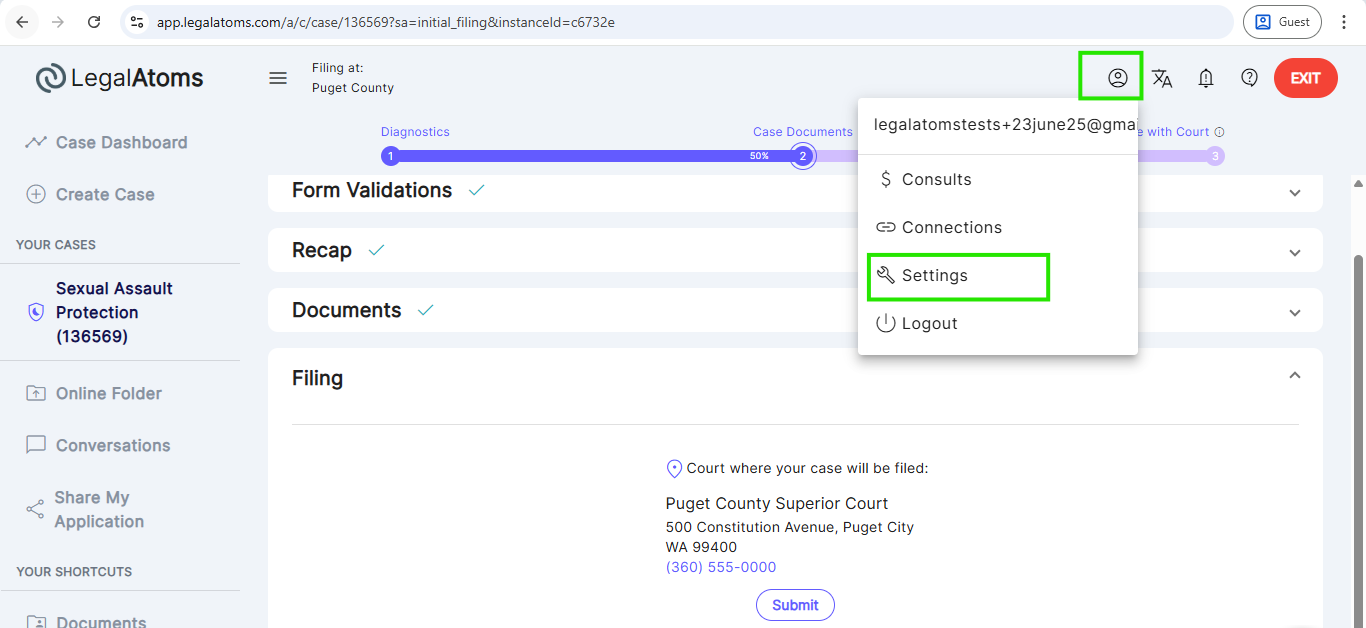
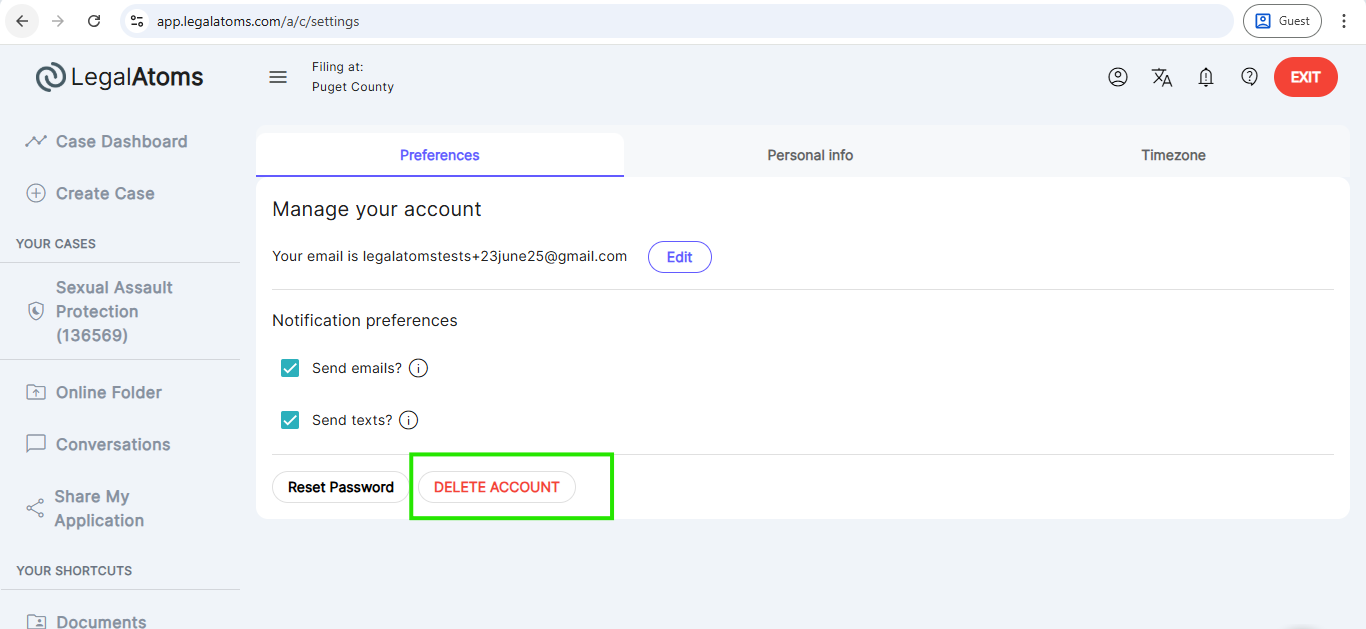
Step 3: Click on DELETE ACCOUNT
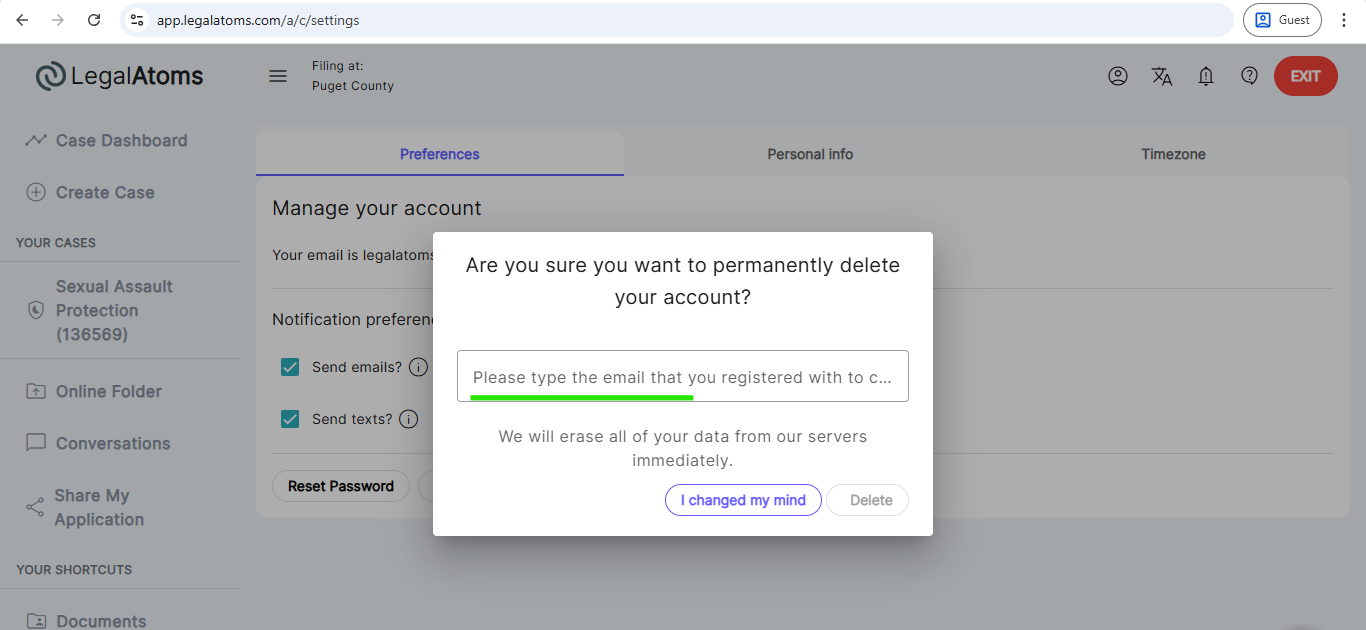
Step 4: Re-enter the email you used to register the account and click Delete
What happens after you delete your account
When you delete your LegalAtoms account, we remove your access and purge your personal data from LegalAtoms systems except where retention is required or your data has already been shared outside LegalAtoms (for example, with a professional, the court, or a sheriff).
What LegalAtoms deletes (standard behavior)
-
Your account profile (name, email, phone, address, profile details).
-
Draft questionnaires, answers, and unfiled forms generated from your answers.
-
Files you uploaded that were not shared with other users.
-
Your session tokens and access to the account.
What may be retained or cannot be deleted (important limits)
-
Information already shared with a professional (lawyer, clerk, advocate) may remain in their workspace and records under their retention obligations.
-
Court filings and court records (anything filed or e-filed) are controlled by the court and cannot be deleted by LegalAtoms.
-
Legally required records (e.g., invoices, payment and audit/fraud-prevention logs) may be retained in minimal form.
-
Copies already delivered to others (emails, documents they downloaded, messages in other participants’ inboxes) cannot be recalled.
-
Encrypted backups and system logs may contain your data until routine rotation; these are not used for normal access.
-
Third-party integrations (e.g., calendar, email providers, e-filing gateways, or messaging vendors) may continue to hold copies of data you shared through them.
Special situations
-
Shared but not filed cases: Your data is deleted from your LegalAtoms account, but the professional’s copy may remain. Contact them directly if you want their copy removed.
-
Filed cases: Your court case continues. Hearings, deadlines, or fees still apply. For record changes (e.g., sealing/expungement), contact the court.
-
Active cases at time of deletion: LegalAtoms stops processing your data and stops sending updates; provide the court and your professional with an alternate contact method.
-
Organization-managed accounts: If an organization invited or manages your account, they may retain copies per their policy, contact them directly.
-
Identity checks, e-signatures: Signature certificates and audit trails associated with shared or filed documents may persist with recipients.
Notifications & messaging after deletion (including E-Serve / sheriff rules)
-
LegalAtoms does not send a post-deletion confirmation email or SMS.
-
After deletion, no further messages (proof of service notices, full orders, conversation messages, referrals, etc.) are sent by LegalAtoms on your behalf.
-
E-Serve notifications (text, email, WhatsApp):
-
If an E-Serve notification was already sent before deletion, the recipient keeps it, deletion does not retract it.
-
If your account is deleted before an E-Serve notification is sent (whether initiated by you, a sheriff, or another party via LegalAtoms), the pending notification is canceled and will not be sent.
-
If your account was deleted and you later contact LegalAtoms with respondent details or share the case with a sheriff, LegalAtoms will not send E-Serve on your behalf unless you reactivate your account (or otherwise re-establish an active sender identity within LegalAtoms).
-
If the sheriff independently triggers service outside of LegalAtoms after your deletion, that is handled by the sheriff’s process, and LegalAtoms will not re-initiate service communications for the deleted account.
-
-
If you continue to receive messages from LegalAtoms after deletion, please report it, this should be treated as a defect and stopped immediately.
Billing & subscriptions
-
Deleting your account does not automatically cancel outstanding invoices, court fees, or third-party subscriptions. Please resolve billing items first.
Re-creating an account
-
If you sign up again with the same email, it will be a new account. Prior data will not be restored (except for any minimal records we must lawfully retain).
Quick checklist before you delete
-
Download and save any documents you need for your records.
-
Tell your professional and the court how to reach you going forward.
-
Disconnect third-party integrations (e.g., calendars) if you no longer want them to hold any events or data.
-
If you have scheduled E-Serve notifications, consider completing or canceling them before deleting to avoid confusion.
FAQ
Will deleting my account cancel my court filing or hearings?
No. Court filings and scheduled hearings are independent of your LegalAtoms account and remain active.
Can LegalAtoms delete documents from my lawyer’s account?
No. Information shared with a professional is governed by their retention policies—contact them directly.
What happens to our conversations?
Your conversations are deactivated for your account. Messages already delivered to other participants remain in their history.
Do you send a confirmation email or SMS after deletion?
No. LegalAtoms does not send post-deletion confirmations. You’ll see the in-app message before you confirm deletion: “We will erase all of your data from our servers immediately.”
What if the sheriff didn’t trigger E-Serve before deletion?
If the sheriff never triggered E-Serve before the account deletion, LegalAtoms will not later send E-Serve on that deleted account’s behalf. If service is later required, the user must reactivate their account or otherwise establish an active sender identity in LegalAtoms.
If the account is deleted but the client later gives respondent details, does LegalAtoms (or sheriff) send notifications?
No. LegalAtoms will not send notifications for a deleted account. The client should reactivate the account (if allowed) or work directly with the sheriff/professional to initiate service outside LegalAtoms.
Can I come back later and get my old data?
No. If you re-register, it will be a new account. Prior data is not restored.
About The Author

Related Posts
Can I Appeal A Small Claims Judgment Illinois
Recently updated on December 22nd, 2025 at 11:12 am Overview In Illinois, every party in a small claims case—plaintiff or defendant—has the right to appeal a judgment entered by a circuit-court judge. Although the small claims division is designed for speed and informality, its decisions are legally binding. If you believe the judge misapplied the…
Illinois Small Claims court Process Self Represented
Recently updated on December 22nd, 2025 at 10:46 am Overview The Illinois Small Claims Court is designed for speed, simplicity, and self-representation. It handles civil disputes involving $10,000 or less, excluding interest and court costs. The process is structured to be accessible to citizens without lawyers—what Illinois courts call “pro se” litigants. By providing standardized…
Illinois mall Claims Court Forms Fees
Recently updated on December 22nd, 2025 at 10:42 am Overview The Illinois Small Claims Court provides an efficient and affordable way for individuals and small businesses to resolve monetary disputes of $10,000 or less. Designed for self-represented litigants (pro se), the system simplifies traditional civil procedures through standardized forms, limited motion practice, and straightforward evidence…
What Qualifies For Small Claims Court Illinois
Recently updated on December 22nd, 2025 at 10:48 am Overview The Illinois Small Claims Court exists to resolve civil disputes involving money claims of $10,000 or less. It provides a simple, fast, and affordable way for people to pursue justice without needing an attorney. The rules are governed by Illinois Supreme Court Rules 281–289, which…