
An efficient case management system for Alternative Dispute Management Programs
LegalAtoms allows Mediators, Arbitrators and Negotiators to conduct their work online to efficiently intake clients, disseminate documents, hold meetings, and collaborate in an online space towards final agreements
Case Management System
A structured intake workflow that reveals each party’s underlying interests, priorities, and constraints. Inspired by facilitative and interest-based mediation, this feature helps mediators quickly surface what truly matters rather than just stated positions. It organizes emotional, financial, and legal needs into clear dashboards, enabling mediators to tailor sessions, identify common ground early, and reduce time spent untangling unclear narratives.
Analysis
An evaluative-style module that automatically highlights legal benchmarks, comparable outcomes, and settlement ranges based on case type. It equips mediators to perform non-binding reality checks that ground parties in practical expectations. The system presents neutral, digestible comparisons, enabling mediators to correct optimism bias, anticipate stalemates, and steer conversations back to achievable solutions without taking sides or issuing judgments.
Collaboration Tools
A communication layer modeled on transformative and narrative mediation principles. It supports confidential caucus notes, reframing prompts, emotion-tagging, and structured messaging designed to de-escalate conflict. Mediators can signal key themes, flag recognition moments, and maintain balanced dialogue histories. This helps parties feel heard, reduces escalation risk, and preserves rapport across sessions—critical in ongoing relationships like co-parenting or workplace disputes.eep it 100% updated and accurate at any given time.
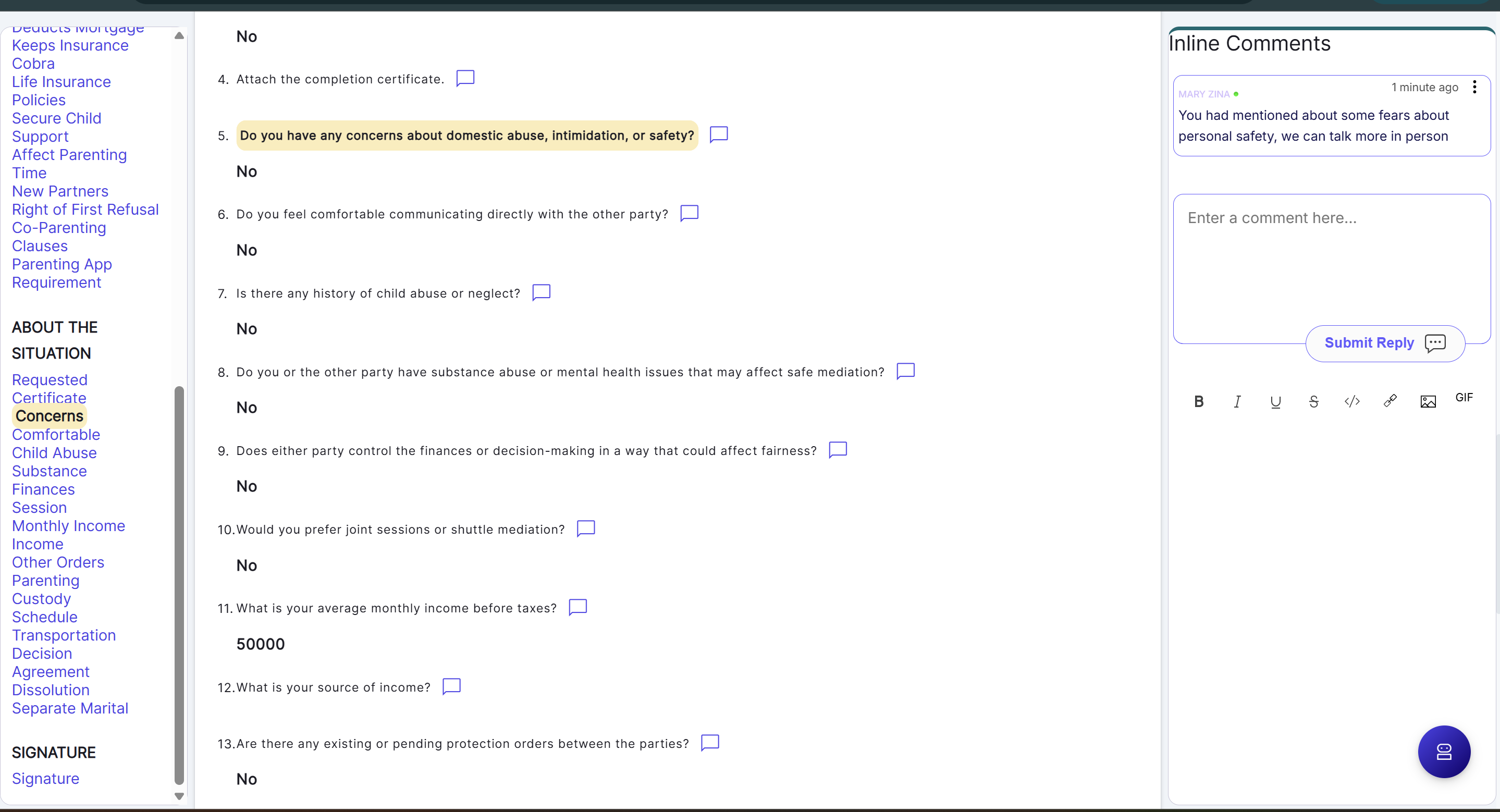
Inline Comments for Collaboration
As just one example, the inline comment feature lets mediators and parties discuss specific negotiation points asynchronously, without meeting together. Each comment thread is tied to a discrete issue, preserving clarity and reducing conflict. Unresolved items appear in a centralized list, allowing everyone to track progress, address sticking points efficiently, and move steadily toward agreement.
LegalAtoms, the leader in electronic preparation and filing also allows law enforcement officials to reliably deliver electronically by relying on read receipts, and making it easier for respondent to digitally sign and acknowledge.
Even before COVID-19, serving clients is a time and labor intensive operation. While COVID-19 made it almost impossible, it led us to question why the universally available technology in delivering messaging and recording acknowledgements is not employed to improve serving reliability and cutting costs.
LegalAtoms provides multi-channel deliver using e-mail, text messaging, WhatsApp and social media.
How it works for the Mediator (Arbitrator)

A court clerk, or any member of the public (e.g. client) or the mediator himself can create from the profile (See Sample Profile)

Mediator invites each party thorough SMS or Email. Each party shares their concerns, priorities, and desired outcomes. The mediator uncovers interests beneath positions, manages emotions, and ensures both sides feel heard.

The mediator facilitates option-generation, reality-testing, and private caucuses as needed. Parties evaluate proposals, refine tradeoffs, and work through sticking points.

The mediator helps parties confirm decisions, settle remaining issues, and produce a clear written agreement or summary. Any unresolved items are identified for future sessions or court.
How it works for a party

A party is presented with the background and an overview of the case process, right to counsel, and laws around alternative dispute resolution e.g. Mediation in plain language, along with the steps ahead until completion

Party fills questionnaires in plain language about their stated positions. An evaluative-style module that automatically highlights legal benchmarks, comparable outcomes, and settlement ranges based on case type.

Tenants can benefit from the Right to Counsel program
Tenants can then formally file paperwork for Rent Assistance Program or proceed ahead with an eviction case
How it works for you (court staff)
Upon deciding a case needs to be sent for Mediation, a clerk will visit the appropriate Mediator's webs page (running on LegalAtoms) and create a complete request, and also upload all the case documents
After receiving the packets, the clerk can communicate with the petitioner using secure built in chat, and video call features in LegalAtoms.
Clerks can review the documents (MS WORD, PDF) , make corrections and/or send notes to clients for revisions.
The clerk can then approve or reject. Then the clerk has ability to move the case forward to the commissioner, law enforcement within LegalAtoms or using their existing system to have all capabilities in a paperless format.